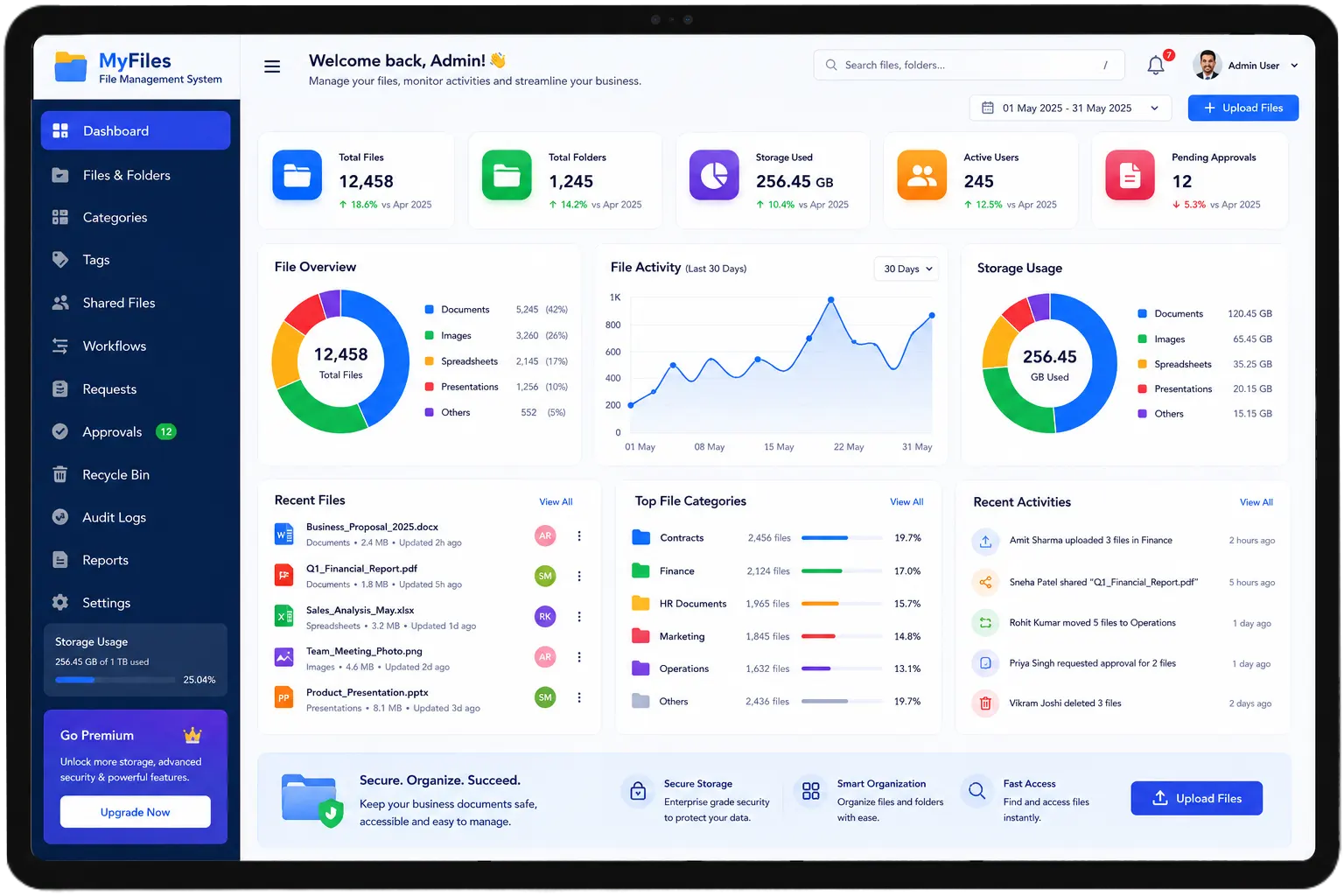
File Management System for Organised, Trackable and Paperless Office Operations
Most offices deal with the same problem every week. Someone needs a file. Nobody knows where it
is. It was last seen with a colleague who is on leave. The physical copy is somewhere in a
cabinet that has not been properly organised since the last audit. 20 minutes later, the file
turns up — or it does not, and someone has to recreate it from scratch.
A file management system does not just store documents. It tracks them,
organises them, controls who can access them, and makes sure nothing goes missing in the
processes that depend on them.
Is your team spending more time finding files than working on them?
MLAI Solution’s File Management Software gives offices, departments, and teams a
single platform
to store, organise, track, assign, and retrieve files and documents — digitally, with complete
access control and a full audit trail. Whether you need a File Tracking System
for physical file
movement or a Work Management System for task and document workflows, our
platform handles both
from one dashboard.
File and Document Problems That Slow Every Office Down
Does Any of This Sound Familiar?
A file requested by senior management that takes three people and forty
minutes to locate because nobody logged where it was sent last.
Physical files moving between departments with no record of who has them,
when they received them, or when they are expected to return them.
Documents stored on individual computers and shared drives with no
consistent naming, no version control, and no clear ownership.
A new team member who cannot find the files they need to do their job
because there is no organised system — just folders that made sense to whoever created them
three years ago.
Compliance audits that require pulling together documents from fifteen
different locations across two departments and one external drive.
Time to locate one file
Illustrative comparison
Where documents live today
These are not edge cases. They are the daily reality of office operations that have grown beyond what
informal file management can handle. The right File Management System makes every
one of these problems go away.
One Platform for All Your Files and Documents
What is a File Management System?
One Place for Every File, Every Task, Every Document
A File Management System is a digital platform that organises,
stores, tracks, and controls access to every file and document within an organisation — from the
moment it is created or received to the moment it is closed or archived.
MLAI Solution’s platform goes beyond basic document storage. It tracks physical
file movement between departments, manages task and work assignments linked to documents,
controls who can view or edit each file, and generates a complete audit trail of every action
taken on every document.
Think of it as a Work Management Platform that connects files to
the people and processes that depend on them — so nothing gets lost, nothing goes untracked, and
everyone always knows exactly where things stand.
If your business needs more than just file management, MLAI Solution has other
tools that fit naturally alongside it. The Meeting
Room Management System takes the chaos out of
room scheduling. The Lead Management System keeps sales follow-ups from falling through. The
Helpdesk
Management System gives support teams a structured way to handle requests. And the
Material
Management System brings the same kind of order to material tracking that this system
brings to documents. Each one solves a different problem — but they all run on the same
platform.
Key Features
Key Features of Our File Management Software
Digital File Storage and Organisation
Every document is stored in a structured digital system — organised by department, project, date,
or any categorisation that fits the organisation’s workflow. Our File Management
Software makes every document searchable and retrievable in seconds — not in
minutes after checking three different locations.
File Tracking System
Every physical file or digital document has a movement history — who received it, when, from
whom, and what action was taken. Our File Tracking System gives managers a live
view of where every file currently is, who last accessed it, and what its current status is —
without calling around to find out.
Task and Work Assignment
Documents do not just sit — they need action. Our Task Management Software
allows tasks to be created and assigned directly against files and documents — with deadlines,
priority levels, and status tracking. Team members know exactly what they need to do and when,
and managers can see progress without chasing updates.
Work Management System Dashboard
A centralised dashboard showing all active files, pending tasks, overdue items, and
department-wise workload. Our Work Management System gives managers and
administrators a complete picture of operational activity — files in progress, tasks assigned,
documents awaiting approval, and items that are overdue.
Access Control and Permissions
Every file and folder has defined access permissions — view only, edit, download, or share. Our
File Management System ensures sensitive documents are accessible only to
authorised users, with every access logged for compliance and audit purposes.
Version Control and Document History
Every edit to a document creates a new version — with the previous version preserved and
accessible. No more overwriting the wrong file or losing changes made by a colleague. The
complete edit history is always available.
Search and Retrieval
Find any file in seconds — by name, date, department, file type, tag, or content. Our
Work Management Software makes the organisation’s full document library
searchable without knowing exactly where something was filed.
Reports and Audit Trail
Complete logs of every file access, document edit, task completion, and file movement — available
as reports for internal review or compliance audits. The audit trail is always up to date and
always available without manual compilation.
HOW IT WORKS
How Our Work Management System Works
1
Step 1 — File Created or Received
A new document is uploaded or a physical file is registered in the system — with details,
category, department, and assigned owner. The file is immediately searchable and trackable.
2
Step 2 — Task Assigned Against the File
If the file requires action — review, approval, processing, or response — a task is created
and assigned to the right team member with a deadline. The assignee receives a notification
immediately.
3
Step 3 — File Tracked as It Moves
If the file moves between departments or team members, each transfer is logged in the system.
The File Tracking System always shows the current location, the movement
history, and who is responsible for it right now.
4
Step 4 — Task Completed and Status Updated
When action is taken on the file, the task is marked complete with notes and any updated
documents attached. The file status updates automatically. The manager sees completion
without asking for a status update.
5
Step 5 — File Archived or Closed
When the file’s lifecycle is complete, it is archived in the system — searchable and
retrievable if needed, but removed from the active workload. The full history of every
action taken on the file is stored permanently.
Benefits
Benefits of Using a File Management System
For Office and Administration Teams
Files are always findable. Tasks are always visible. Nothing goes missing because it was not
tracked properly. The administrative workload that comes from managing files manually — logging
movements, chasing updates, hunting for documents — drops significantly when the system handles
it automatically.
For Managers and Department Heads
A live view of every active file, every pending task, and every overdue item — without asking the
team for updates. Decisions get made on current information rather than on what someone
remembers from the last meeting. And when compliance requires a document audit, the records are
already complete.
For the Organisation
Sensitive documents are protected by access controls. File versions are preserved. The audit
trail is always available. And the institutional knowledge that currently lives in individual
folders on individual computers gets moved into a shared, organised, accessible system that the
whole organisation can rely on.
INDUSTRIES
Who Uses Our File Management Software
Corporate Offices and Enterprises
Large organisations with multiple departments, high document volumes, and compliance requirements
use our Best Task Management Software to keep files organised, tasks tracked,
and audit records always current.
Legal and Professional Services
Law firms, CA firms, and consulting practices use our File Tracking System to
manage client files, track document movement between team members, and maintain the complete
history of every client engagement.
Government and Public Sector
Government offices with high physical file volumes and interdepartmental movement use our system
to track every file through its full lifecycle — from receipt to processing to archiving — with
complete accountability at every step.
Healthcare and Hospitals
Hospitals and clinics use our File Management System to manage patient records,
medical reports, compliance documents, and administrative files — with access controls that
ensure sensitive patient information is accessible only to authorised staff.
Educational Institutions
Schools, colleges, and universities use our Work Management Platform to manage
student records, academic files, administrative documents, and compliance paperwork — with clear
ownership and trackable movement across departments.
Built Around How Offices Actually Handle Files and
Work
Most Work Management Software is built for project management or
pure document storage — not for the reality of office operations where physical files move
between departments, tasks are linked to documents, and compliance requires a full audit trail
of every action taken.
MLAI Solution’s File Management System is built around that
reality. File tracking, task management, access control, version history, and audit reporting —
all connected in one platform that fits how offices actually work.
For organisations already managing front desk operations through our Visitor
Management System or support operations through our Helpdesk
Management System — the file management system sits naturally alongside them for
complete office management in one place.
Quick to set up — most organisations are managing files digitally within days.
Configured for your workflow — folder structure, access permissions, task workflows, and
reports all set up to match how the organisation operates.
Works for any size — a 10-person office and a 1000-person enterprise use the same system.
Real support — a team that responds when something needs adjusting.
Client Voices
What Our Clients Say
★★★★★
"
Their team delivers high-quality results, attentive service, and
reasonable
pricing. The work is done to the full extent, on time and at a high quality level. It
complies
with requirements due to the highly skilled team.
TC
Corporate Client
Tata Consumer Products
★★★★★
"
We are using MLAI in our organisation (Mayfair Tea Resort) for almost 1
year.
It is working fine and helping our organisation manage the vendor movement efficiently and
professionally.
MT
Operations Manager
Mayfair Tea Resort
★★★★★
"
We were looking for a reliable visitor management system for our
corporate
office, and MLAI gave us what we needed. The system is intuitive, secure, and our staff
adapted
to it very quickly.
CO
Facility Manager
Corporate Office, Delhi
★★★★★
"
Visitor management software automates check-in, tracking, and badge
printing,
enhancing security and efficiency. It integrates with our access control systems and the
visitor
analytics are very useful.
IT
IT Director
Enterprise Client, Noida
★★★★★
"
I have visited their office — staff behaviour is very nice and the
product is
available with good quality. Their support team responds very promptly to any queries or
issues
we raise.
BO
Business Owner
SME Client, India
★★★★★
"
MLAI Solution has been instrumental in digitizing our security
operations. The
guard patrolling system with real-time tracking has improved guard accountability and
reduced
security incidents significantly.
SH
Security Head
Industrial Facility, India
Client testimonials will appear here once added.
FAQ
Frequently Asked Questions About File Management System
Got questions? We have answers. Here's everything you need to know
about MLAI Solution and our products.
A File Management System is a digital platform that
organises, stores, tracks, and controls access to every file and document within an
organisation. Files are uploaded or registered in the system, tasks are assigned against
them, movement between departments is logged, and a complete audit trail of every action
is maintained automatically.
File Management Software eliminates the time spent
searching for files, prevents documents from going missing, controls who can access
sensitive information, maintains a complete version history, and generates audit-ready
records automatically. The administrative burden of managing files manually drops
significantly when the system handles tracking, access control, and reporting
automatically.
Our File Tracking System logs every movement of every
file — who received it, when, from whom, and what action was taken. When a file moves
between departments, the transfer is recorded immediately. Managers see the current
location and movement history of any file in the system without calling around to find
out.
A Work Management System connects files and documents
to the tasks and people that need to act on them. Tasks are assigned with deadlines and
priorities, progress is tracked in real time, and managers see the complete workload
across their team without asking for status updates. The result is an office where work
moves forward systematically rather than depending on informal follow-up.
The best Task Management Software should include task
creation and assignment with deadlines, priority levels and status tracking,
notifications for assigned tasks and approaching deadlines, progress visibility for
managers, connection between tasks and the documents they relate to, and reporting on
task completion rates and overdue items.
A Work Management Platform brings files and tasks
together in one place — so team members always know what they need to work on, where the
relevant documents are, and what the deadline is. Managers see the full picture without
chasing updates. Nothing falls through because someone was waiting for a file they did
not know had arrived.
Traditional office management relies on physical files, shared drives,
email threads, and informal coordination — all of which work until the volume or
complexity grows beyond what they can handle. Work Management Software
replaces that with a structured digital system where every file is tracked, every task
is assigned, every access is logged, and the status of every piece of work is always
visible in real time.
Task Management Software gives every team member a
clear view of what they need to do today — tasks assigned to them, deadlines
approaching, and items waiting for their action. Managers see the team’s workload and
can redistribute tasks when something is overdue or someone is overloaded. Daily
coordination happens through the system rather than through meetings and messages.
A Task Management System assigns tasks to the right
person with a clear deadline and priority. The assignee gets notified immediately.
Progress is tracked automatically as the task moves through stages. Managers see
completion rates and overdue items without asking for updates. The process is consistent
every time — regardless of who is assigning or who is receiving the task.
Yes. Our File Management Software tracks every file
from the moment it enters the system — who has it, where it is, what has been done with
it, and where it needs to go next. Physical files are logged when they move between
departments. Digital documents are version-controlled and access-logged. A file that is
in the system cannot go missing without leaving a clear record of where it was last and
who last had it.
A File Management System moves document management
from paper to digital — reducing the need for physical storage, eliminating manual
logging of file movements, and making every document searchable and retrievable in
seconds. Access controls mean the right people always have access to what they need, and
sensitive documents are protected from unauthorised access without requiring manual
gatekeeping.
Ready to Go Paperless?
Stop Losing Time to Files That Cannot Be Found
Every file that takes twenty minutes to locate is twenty minutes that did not need to be
spent. Every task that falls through because the document it depended on was not tracked is
a process failure that a proper File Management System prevents
automatically.
No setup fee · Free demo · Used by 300+
organizations across
India
QUICK & EASY
It's Super Easy!
Want to try Our Product Yourself before Booking a Demo with us?
01
SCAN
Point your phone at any MLAI QR code to get started. No app download, no
login — just instant access to the product.
02
FILL DETAILS
Enter your basic information in a clean, straightforward form. Takes under
a minute to complete.
03
GENERATE PASS
Your digital pass is generated instantly! verified, professional, and
ready to use right away.
Thank You!
Our team will contact you within 2 hours with the right support and information.